Antivirus Security
Posted: September 11, 2008
Threat Metric
The following fields listed on the Threat Meter containing a specific value, are explained in detail below:
Threat Level: The threat level scale goes from 1 to 10 where 10 is the highest level of severity and 1 is the lowest level of severity. Each specific level is relative to the threat's consistent assessed behaviors collected from SpyHunter's risk assessment model.
Detection Count: The collective number of confirmed and suspected cases of a particular malware threat. The detection count is calculated from infected PCs retrieved from diagnostic and scan log reports generated by SpyHunter.
Volume Count: Similar to the detection count, the Volume Count is specifically based on the number of confirmed and suspected threats infecting systems on a daily basis. High volume counts usually represent a popular threat but may or may not have infected a large number of systems. High detection count threats could lay dormant and have a low volume count. Criteria for Volume Count is relative to a daily detection count.
Trend Path: The Trend Path, utilizing an up arrow, down arrow or equal symbol, represents the level of recent movement of a particular threat. Up arrows represent an increase, down arrows represent a decline and the equal symbol represent no change to a threat's recent movement.
% Impact (Last 7 Days): This demonstrates a 7-day period change in the frequency of a malware threat infecting PCs. The percentage impact correlates directly to the current Trend Path to determine a rise or decline in the percentage.
| Threat Level: | 10/10 |
|---|---|
| Infected PCs: | 14 |
| First Seen: | July 24, 2009 |
|---|---|
| Last Seen: | May 6, 2024 |
| OS(es) Affected: | Windows |
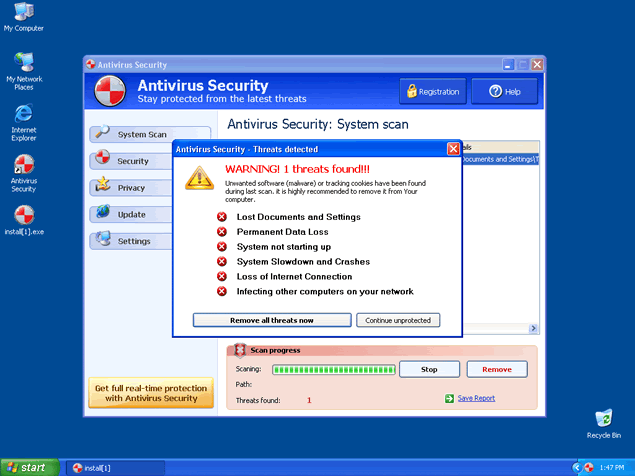 Antivirus Security is a rogue anti-spyware program and clone of Internet Antivirus and Antivirus 2009. Antivirus Security may infect your computer through a Trojan, spam emails or it may have come bundled with another malicious program. Antivirus Security sells itself as an effective spyware remover tool, however, all it does is make you believe you're infected with numerous spyware threats to offer its "licensed" program.
Once you're infected, you'll receive a large amount of popups and system notifications of imaginary spyware threats found in your computer system. To remove these imaginary threats and "protect" yourself, you'll be redirected to Antivirus Security's website or another rogue website to finally purchase the rogue Antivirus Security's full version.
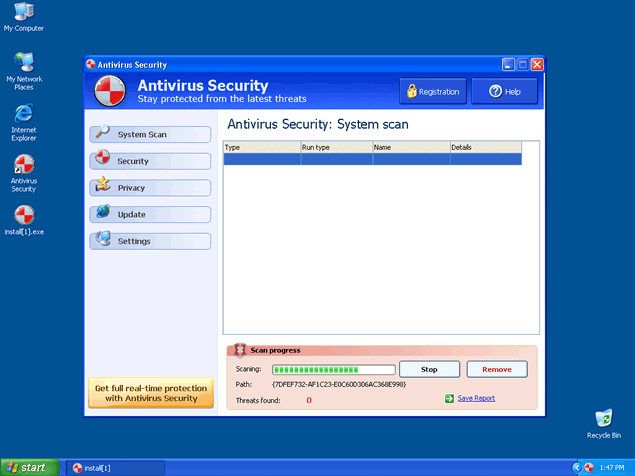
Antivirus Security's trial version is also able to run a fake computer system scan and display a list of security risks supposedly found in your computer system. These risks will not be removed unless you first buy Antivirus Security's "licensed" program. Moreover, Antivirus Security may install a Windows Control Panel file in your Control Panel. This Windows Control Panel file (named Protection Center) may state that you have no Antivirus protection and offer you links that redirect you to Antivirus 2009 's homepage (yes, Antivirus 2009 's homepage) to further download Antivirus Security's full program.


Technical Details
File System Modifications
Tutorials: If you wish to learn how to remove malware components manually, you can read the tutorials on how to find malware, kill unwanted processes, remove malicious DLLs and delete other harmful files. Always be sure to back up your PC before making any changes.
The following files were created in the system:avs.exe
File name: avs.exeSize: 1.18 MB (1183744 bytes)
MD5: db924706a824c5c43feebbe6a781d1ba
Detection count: 31
File type: Executable File
Mime Type: unknown/exe
Group: Malware file
Last Updated: December 11, 2009
C:\rogueware samples\folder\infested 11 11 2022\Virusi infestati 11 5 2022\c1c6e631b6ab57697baaba074e88d3364c722d90
File name: c1c6e631b6ab57697baaba074e88d3364c722d90Size: 898.04 KB (898048 bytes)
MD5: c61f3df0220e78bd8050e47e7d57085f
Detection count: 7
Path: C:\rogueware samples\folder\infested 11 11 2022\Virusi infestati 11 5 2022\c1c6e631b6ab57697baaba074e88d3364c722d90
Group: Malware file
Last Updated: May 6, 2024
Related Posts
- Ultimate Guide to Removing Unwanted Network Ads and Enhancing Network Security
- Securitysoft.site
- Enhancesecurity.co.in
- Securitysoft.website
- Device-security.co.in
We need any help possible to remove Security Antivirus. No matter what we do we can\'t get rid of it!
Please advise!
i have the antivirus 7 and cannot remove it. I need help. thanks
Just to be safe, don't download software you don't plan to use or applications you not sure of. some of us are enticed to install whatever it is we find cool or attractive, even if we don't know how to use it or even if it will only clutter our pcs.